

CMF Profiler provides printing companies, color specialists and laboratories with a workflow for test-chart preparation, measurement-data management, and ICC profile creation, analysis and verification. By recording printing conditions and quantifying color differences, it helps build a traceable foundation for color conversion, device matching and quality evaluation.
Connect chart preparation, measurement, profiling and validation to understand the printing condition behind each profile and the evidence supporting its use.
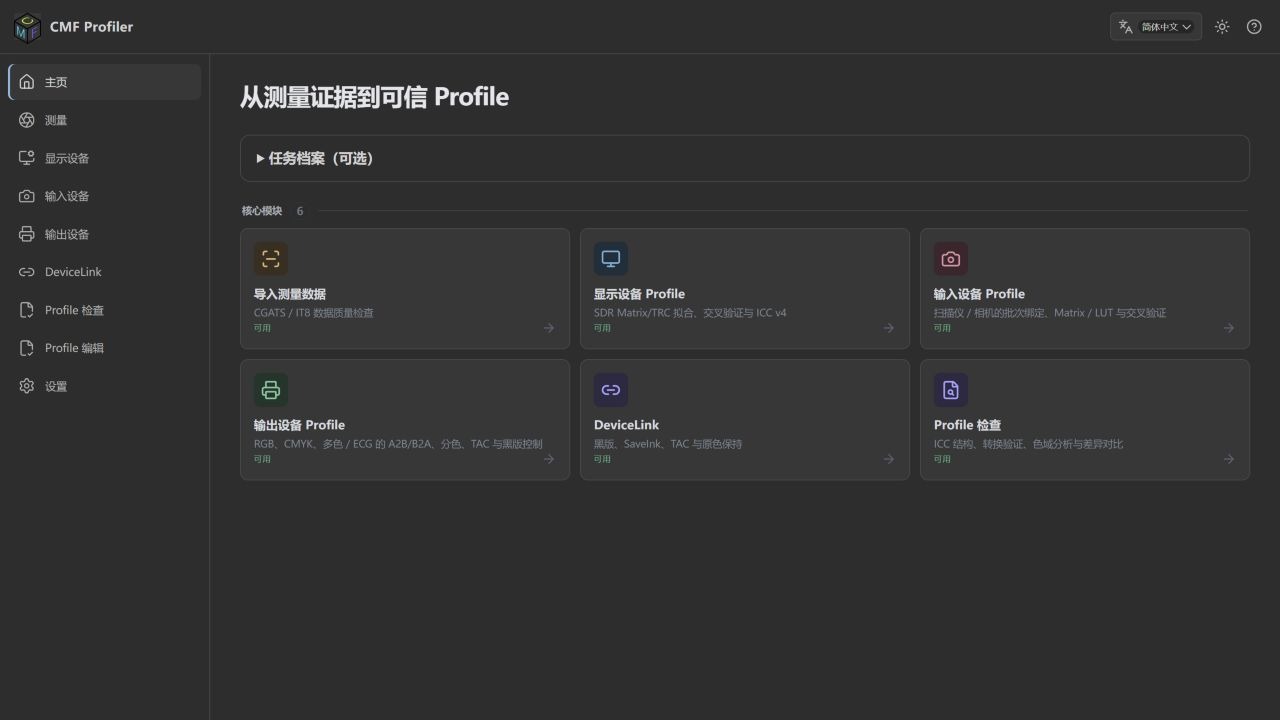
CMF Profiler workspace — measurement, output profiling, DeviceLink and profile inspection
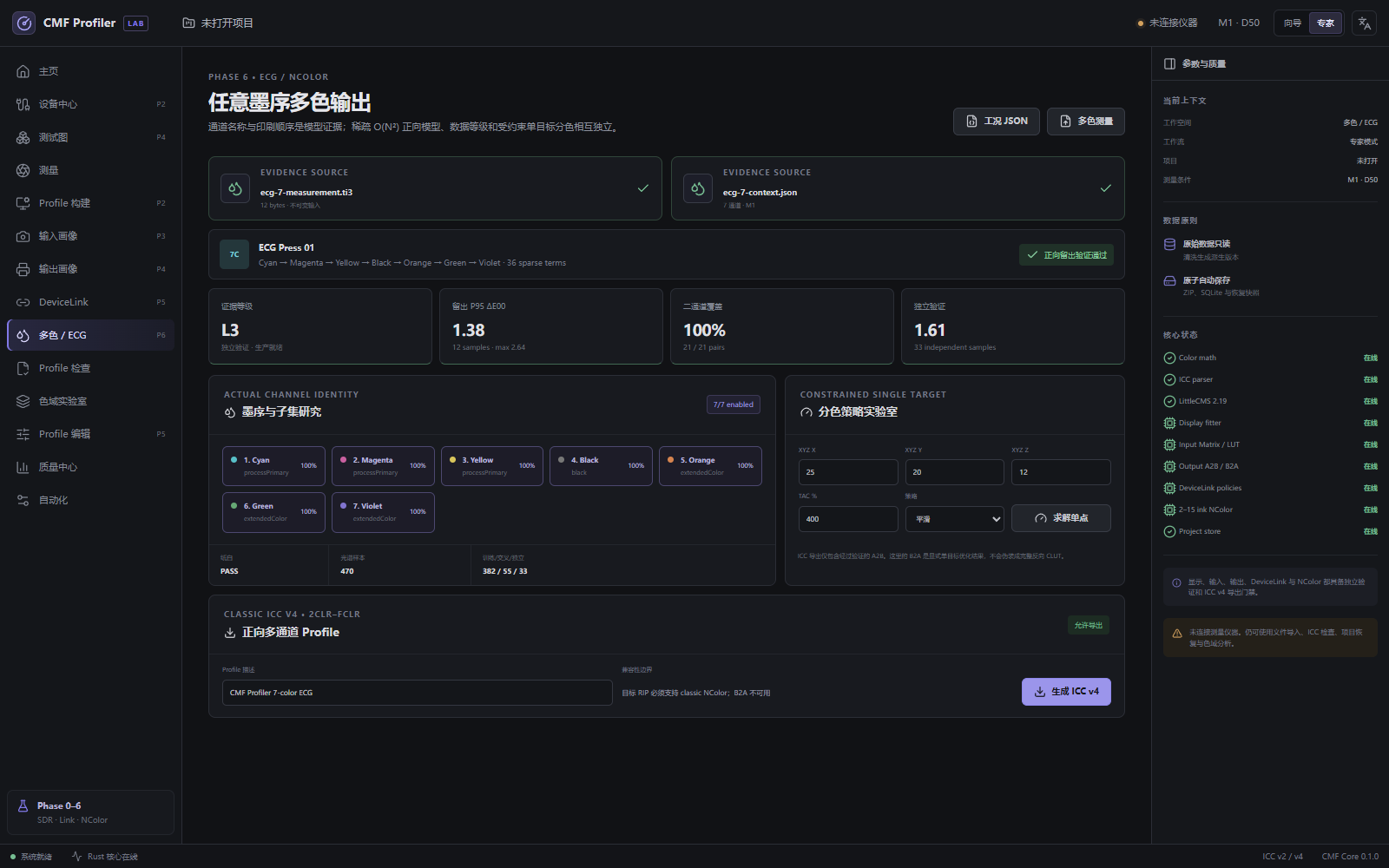
CMF Profiler supports 2–15-channel ECG/NColor characterization with actual ink names and printing order, including seven-color configurations such as CMYK+Orange+Green+Violet. Import measurements and process conditions to build a sparse forward model, examine channel coverage and subsets, and evaluate constrained single-target separation.
Generate classic ICC v4 multichannel profiles (2CLR–FCLR, A2B forward tables) for device-to-PCS interpretation and verification in software or RIPs supporting classic NColor. This capability does not imply a complete multichannel B2A inverse separation table or iccMAX support.
Actual ECG/NColor workspace: seven-ink order, evidence level, independent validation and ICC v4 generation (demonstration data)
Workflow: define inks and order → import measurements and process context → review coverage and evidence level → model and independently validate → export NColor ICC. L0/L1 block export; L2 is limited to verification or soft proofing. Production use requires L3, independent validation and confirmation of the intended printing process.
Measurement preparation: start with dependable data
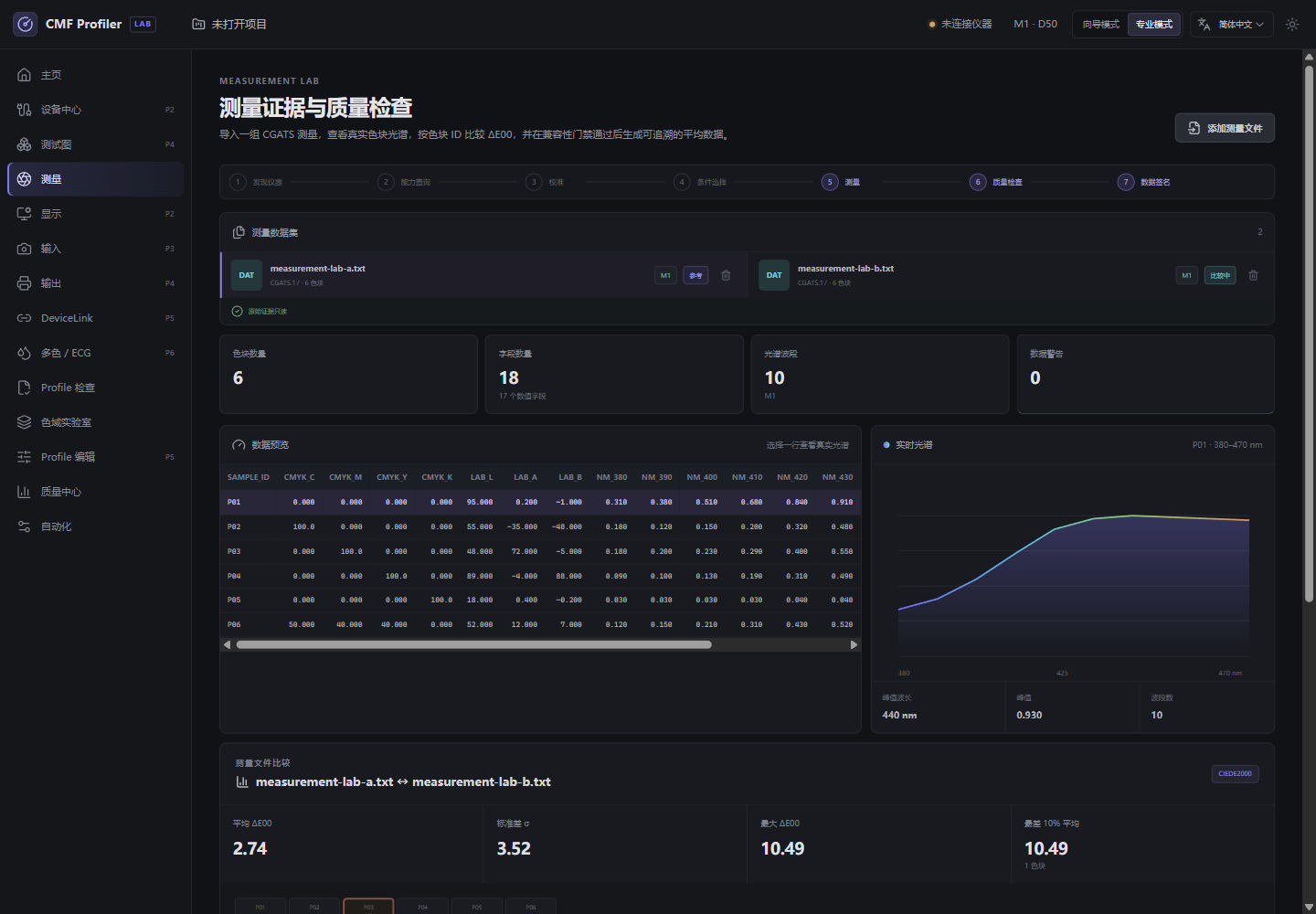
Import CGATS/IT8 measurements, align patches by identifier, compare color differences and apply simple or outlier-resistant averaging. Measurement-condition and chart-compatibility checks help identify inconsistent data before profiling.
Measurement data and spectral review (demonstration data)
Output ICC profiling: characterize the printing condition
Build measurement-driven RGB and CMYK output models and export ICC v4 profiles. Configure total ink, per-channel limits, GCR and black-generation constraints. Different substrates, inks and processes require appropriate characterization and verification.
Chart Studio: connect charts and measurements
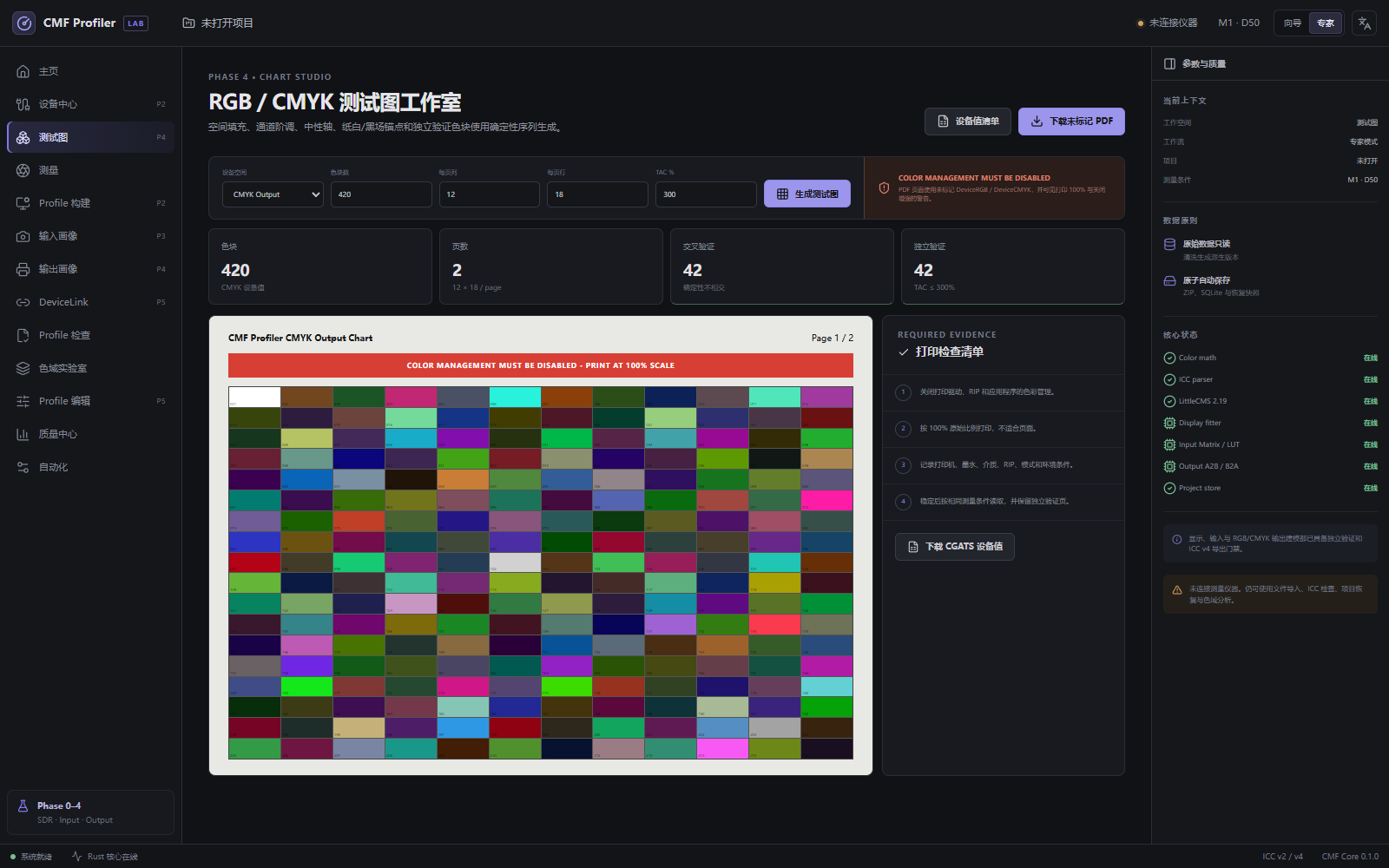
Generate RGB/CMYK chart PDFs and accompanying data files to link chart printing, patch definitions and measurement. The FD-9 workflow can create dedicated patch-coordinate manifests; actual hardware operation requires validation for the instrument configuration.
Chart Studio: chart generation and print-check workflow
DeviceLink: define conversion between devices
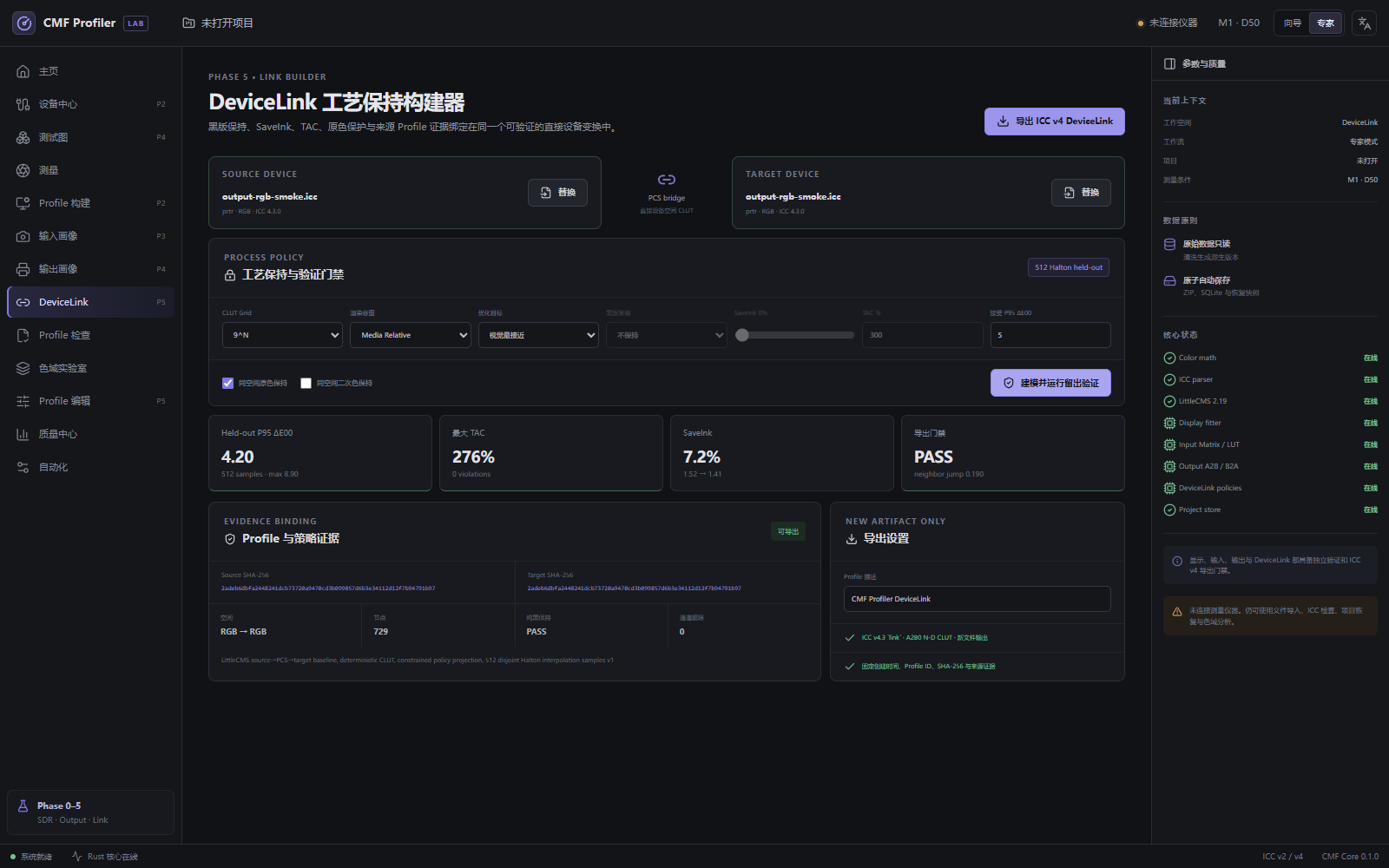
Create RGB/CMYK DeviceLinks with black, ink-saving, total-ink and selected-color policies. Evaluate conversion results using holdout samples to compare parameter choices under defined source and destination conditions.
DeviceLink: conversion policy and holdout validation (demonstration data)
ICC inspection and safe editing
Inspect ICC v2/v4 headers, tags, curves and LUT structures, check structural issues and compare profile semantics. Text-metadata editing writes a new copy and retains source information for traceable file management.
2D and 3D gamut analysis
Explore gamut boundaries and summaries in Lab space and compare the reproducible ranges of different profiles. Use the results to discuss differences between devices, substrates and printing conditions.
Validation and reporting
Separate fitting, cross-validation and independent validation results, and analyze differences using metrics including ΔE76, ΔE94 and ΔE2000. Export HTML, PDF, JSON and XML reports to retain data, settings and conclusions together.
Project management and additional profiling workflows
Organize measurements, models and validation in project files with autosave and recovery history. Command-line entry points support repeated inspections and batch work. Additional workflows cover SDR displays, scanners and cameras under fixed capture conditions.
Output-device characterization, measurement management across substrates and printing conditions, ICC quality inspection, conversion-strategy evaluation, training and laboratory analysis.
Define printing conditions → print and measure a chart → review measurement data → create an ICC profile or DeviceLink → verify with independent data → save the project and report.
Profile suitability depends on measurement quality and stable printing conditions. Instrument compatibility, specific processes and multichannel applications require validation for the intended configuration. Independent measurements and print trials are recommended before production use.
Contact ColorSpace for a demonstration and workflow advice for your printing conditions.
Contact: sales@colorspace.com.cn
Phone: 15817270587
Tel: 400-886-3881(周一至周五 9:00~18:00)
Email: sales@colorspace.com.cn
Add: South Building #2-1101, Lv Di Qi Hang Office Building, Hou Sha Yu, Shun Yi District, Beijing, China